Getting Access
Your Service User credentials will have been sent to you via email. As part of your subscription setup, you will receive an email containing your API key for the Altrata Salesforce app. Please reach out to your Client Success representative or email [email protected] if you have not received your API key or Service User details.
GraphiQL
This guide will teach you how to to authenticate with GraphiQL so that you can use it for a particular API. To authenticate you will need to do the following steps:
In your browser, enter the GraphiQL URL of the API that you wish to query against and press enter
If you are unsure of a GraphiQL URL for a service(s), please visit the URLs page that outlines all URLs
Enter your service account credentials and press sign in.
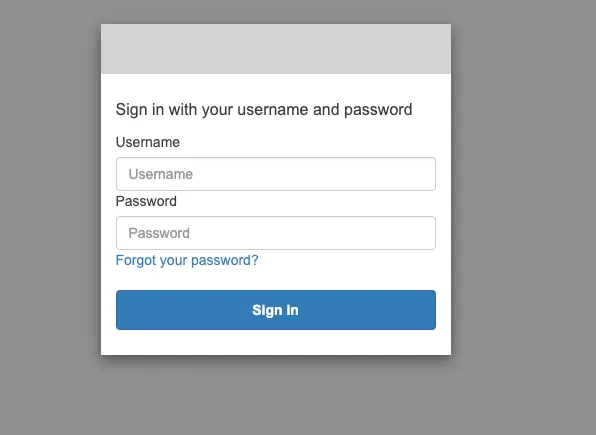
You will now be authenticated and can build your queries.

If you are unsure on how to use GraphiQL, please go to our dedicated GraphiQL Explorer section.
APIs
To gain access to the Altrata API you will need to supply an API key in addition to your Altrata service user credentials.
This guide will teach you how to generate an access token and how to make a request to an Altrata GraphQL API endpoint.
Note: the username for your Altrata service credentials is NOT your email. The username sent during the initial password setup should be used for access
Generating an access token
The access token is a string that contains the credentials and permissions used to access a given resource.
How to generate the access token
There are two ways to send your credentials when requesting an access token:
- Authorisation header — send the username and password as HTTP Basic credentials in the Authorisation header.
- Request body — send the username and password as parameters in the request body.
Authorisation header flow
To generate an access token, you will need to make an HTTP POST request to https://api-auth.altrata.com/oauth2/token
In the request, you will need to specify the following:
curl -X POST \
-H "x-api-key: yourApiKey" \
-u "username:password" \
"https://api-auth.altrata.com/oauth2/token?grant_type=client_credentials" \
Property | Parameter | Value | Description |
|---|---|---|---|
grant_type | Query | 'client_credentials" | The OAuth2 grant type that is used to obtain an access token |
x-api-key | Header | yourApiKey | You will need to enter your assigned API key as the value |
Authorization | Header | username:password | Basic Auth is used for the authorization. If you are making a request via Curl, you can supply your username:password. If you are using a backend language/framework such as Node.js, you will need to ensure that your username and password is base64 encoded when making a request to obtain an access token. See the Node.js example on the right to see how to potentially base64 encode your credentials. |
Once you have made a successful request to obtain an access token, you will get back a 200 response code that contains your bearer access token.
{
      "access_token": "yourAccessToken",
      "expires_in": 28800,
      "token_type": "Bearer"
}
The token is a JSON Web Token. The expiration time for the tokens is set at 28800 seconds, which is the equivalent of 8 hours. Once 8 hours has passed, the token will have expired, and you will need to request a new token.
Please note that if you request a new token before the 8 hours have passed on your existing access token, you will be issued with a new token that will terminate your previous token. This means that you will not be able to use your previous access tokens to make calls to any Altrata API.
Store your access token in a secure location.
Request body flow
To generate an access token, you will need to make an HTTP POST request to https://api-auth.altrata.com/oauth2/token
In the request, you will need to specify the following:
curl -X POST \
-H "x-api-key: yourApiKey" \
-H "Content-Type: application/x-www-form-urlencoded" \
--data-urlencode "client_id=username" \
--data-urlencode "client_secret=password" \
"https://api-auth.altrata.com/oauth2/token?grant_type=client_credentials"
Property | Parameter | Value | Description |
|---|---|---|---|
grant_type | Query | 'client_credentials" | The OAuth2 grant type that is used to obtain an access token |
x-api-key | Header | yourApiKey | You will need to enter your assigned API key as the value |
Content-Type | Header | application/x-www-form-urlencoded | Required when credential is sent in the body. The body is form-encoded, not JSON |
client_id | Body | username | Without the authorisation header when you are sending the credential in body this is the username |
client_secret | Body | password | Without an Authorization header this is your password . |
Once you have made a successful request to obtain an access token, you will get back a 200 response code that contains your bearer access token.
{
      "access_token": "yourAccessToken",
      "expires_in": 28800,
      "token_type": "Bearer"
}
The token is a JSON Web Token. The expiration time for the tokens is set at 28800 seconds, which is the equivalent of 8 hours. Once 8 hours has passed, the token will have expired, and you will need to request a new token.
Please note that if you request a new token before the 8 hours have passed on your existing access token, you will be issued with a new token that will terminate your previous token. This means that you will not be able to use your previous access tokens to make calls to any Altrata API.
Store your access token in a secure location.
Authenticating to use the GraphQL endpoint
Now that you have generated an access token, you will need to do the following to access the GraphQL endpoint:
If you are unsure of a GraphQL URL for a service(s), please visit the URLs page that outlines all URLs
Set your HTTP method to a POST request.
Set the URL to be the GraphQL endpoint that you wish to request.
Include both x-api-key and Authorization headers. Provide your api key as the value in the x-api-key header, and set the valueBearer and include your access token for the Authorization header.
curl --location --request POST 'https://profile.altrata.com/v1/graphql' \
--header 'Authorization: accessToken' \
--header 'x-api-key: apiKey'