Pathfinder
3 min
Pathfinder shows you the warm paths between two endpoints — people, organizations, or your lists — using Altrata's relationship data.
Where to find it
- Open Salesforce.
- Click the Altrata tab in your navigation (or find it via the App Launcher).
- Select Pathfinder.
How to run a search
Pathfinder uses two endpoints:
- From: a person or organization
- To: a person or organization
Supported combinations:
- Person to person
- Person to organization
- Organization to organization
Use the Filter by menu (top right) to control which connections appear:
- All connections
- Direct connections
- 2nd degree connections
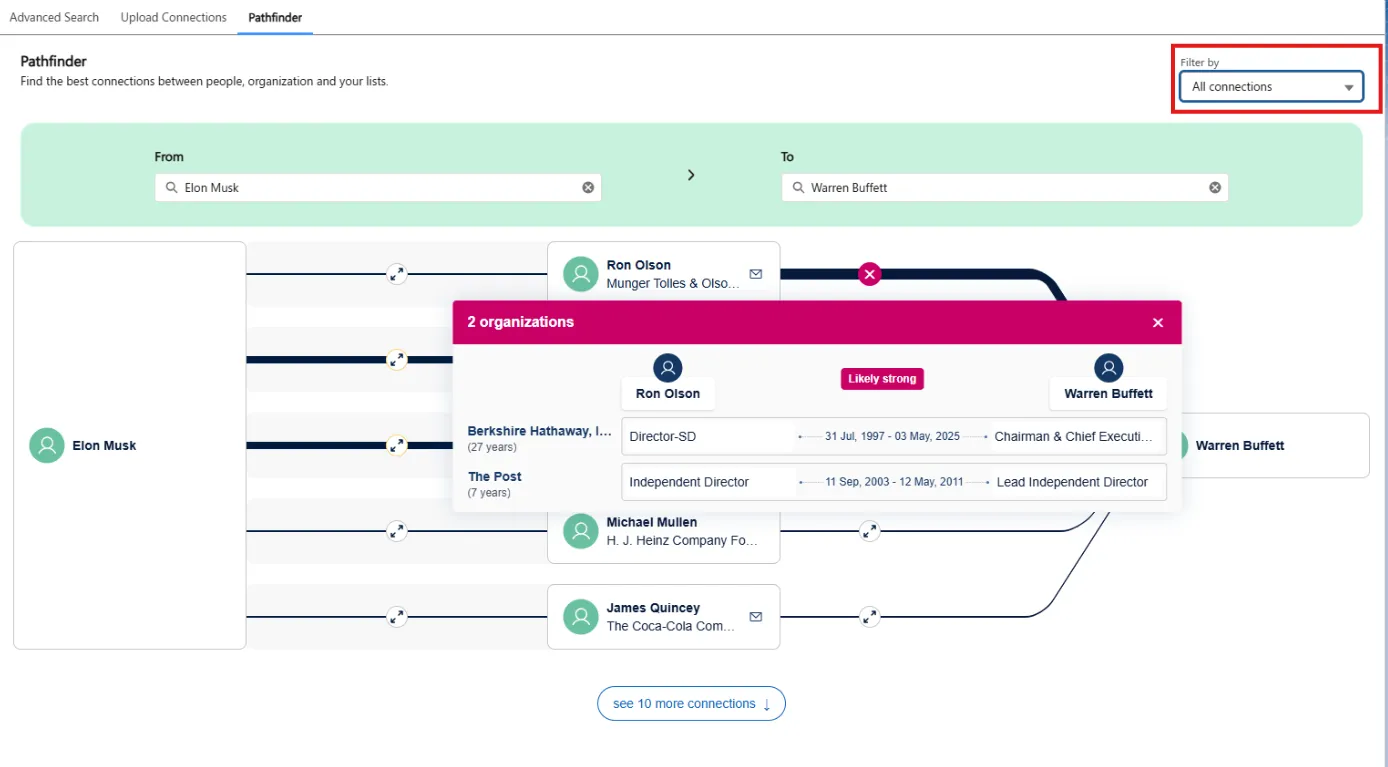
Reading the results
The path map indicates relationship strength visually — bolder lines mean stronger connections.
Click into any path to see relationship detail (e.g., "Likely strong"), the people involved, the organizations they share, and the roles that link them.
You can adjust the network display to load more connections and explore the network more deeply.
Best practices
- Start with Direct connections for the cleanest warm intro path; widen to 2nd degree only if you need to.
- Read the relationship detail before reaching out. Knowing the nature of the link (former colleague? board co-member?) shapes the message.
- Pathfinder pairs well with Advanced Search. Identify a target in Advanced Search, then pivot to Pathfinder to find your warmest path in.