Editing a Contact
Once you load in Contacts, you can edit them.
If you click on the Network tab, your contacts will appear.You can upload more connections or contacts here, but you can also adjust the existing ones you have. Whether you wish to remove them because they are no longer a relationship or whether you wish to adjust the connection strength of a particular connection.
Removing a Contact
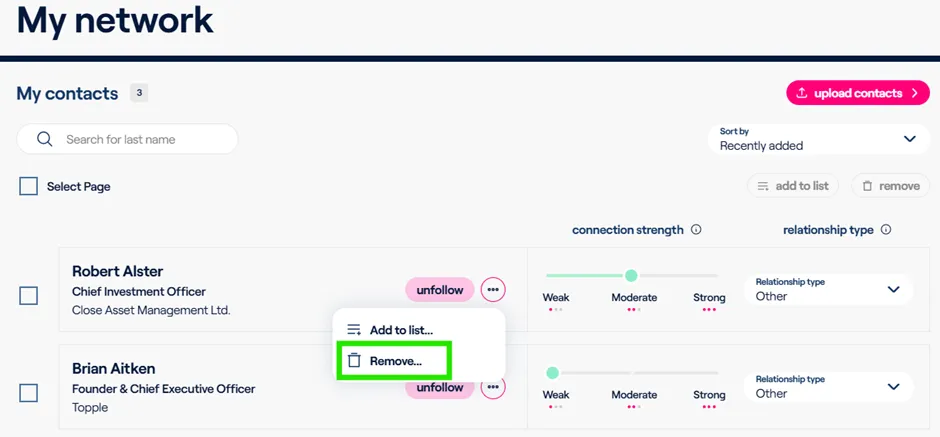
To remove a Contact from your account, click on the ellipsis next to the profile and select “Remove”
Editing Connection Strength
Connection strength is an optional setting that allows you to better denote how well you know a particular contact.
For example, if I know Robert I can easily say that he's a weak, moderate, or strong connection strength to better denote to myself and colleagues how well I know him.
If you need a reference for what the connection strength types pertain to:
- A weak connection strength is someone that maybe you've met at a conference once or twice.
- A moderate connection strength is an old colleague who you've worked with in the past.
- And a strong connection strength is someone that you interact with relatively frequently. Someone that you'd be very comfortable calling or emailing and can expect a response back in a reasonable time frame.
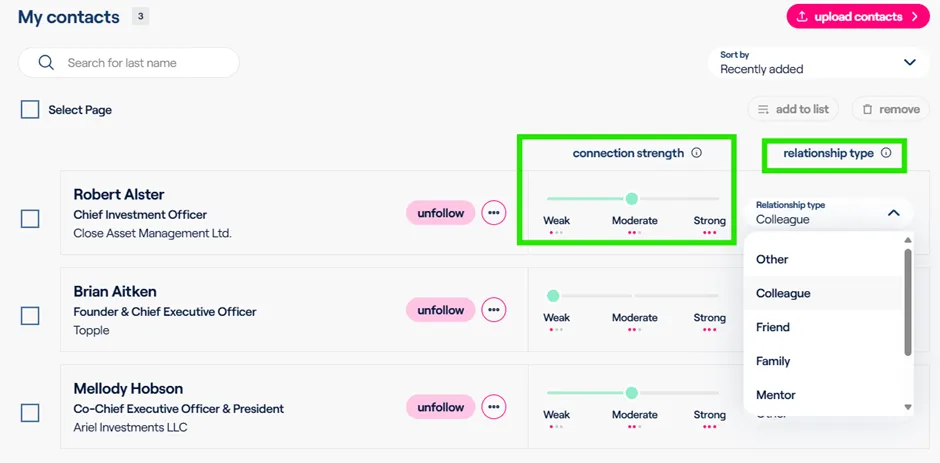
And you could also adjust the relationship type if you wish. Which allows you to indicate to yourself and to your colleagues who this contact is to you (e.g. Colleagues vs Family)